

The Jeep Grand Cherokee key fob may not be detected due to a dead battery or signal interference. Replacing the battery or moving the fob closer might resolve the issue.
A key fob not being detected can be a frustrating experience for Jeep Grand Cherokee owners. Common causes include a dead battery in the fob or signal interference from electronic devices. Ensuring the key fob is within range and trying to start the vehicle again may help.
Regularly checking the battery condition and keeping the fob away from potential signal disruptors can prevent such issues. For persistent problems, consulting the vehicle manual or contacting a dealership may be necessary. By maintaining the key fob, owners can ensure a smoother and more reliable driving experience.
Common Causes
If your Jeep Grand Cherokee key fob is not detected, it can be frustrating. Understanding the common causes can help you troubleshoot the issue quickly. Below are the primary reasons why your key fob might not be working.
Battery Issues
The most common cause of a key fob not being detected is a dead or weak battery. Key fobs rely on batteries to send signals to your car. When the battery is low, the signal can be too weak to be detected. Follow these steps to check the battery:
- Open the key fob using a small screwdriver.
- Remove the old battery carefully.
- Check the battery type and replace it with a new one.
- Close the key fob and test it again.
Always use the correct battery type for your key fob. Incorrect batteries can cause malfunctions. A fresh battery can resolve many key fob issues instantly.
Signal Interference
Signal interference can also cause your key fob to not be detected. Various factors can interfere with the signal between your key fob and your car. Here are some common sources of signal interference:
| Source | Description |
|---|---|
| Electronic Devices | Devices like smartphones and laptops can interfere with the key fob signal. |
| Metal Objects | Metal objects can block or weaken the key fob signal. |
| Other Key Fobs | Other nearby key fobs can interfere with your key fob’s signal. |
To reduce signal interference, keep your key fob away from other electronic devices. Make sure no metal objects are blocking the signal.
Following these tips can help ensure your key fob is detected by your Jeep Grand Cherokee.

Credit: www.reddit.com
Battery Replacement
Experiencing issues with your Jeep Grand Cherokee key fob not being detected? The solution might be simpler than you think. Often, the problem lies with the key fob’s battery. Replacing the battery can restore functionality and save you a trip to the dealership. This guide will walk you through identifying the correct battery type and provide a step-by-step replacement process.
Identifying Battery Type
Before you begin, you need to know the correct battery type for your key fob. Most Jeep Grand Cherokee key fobs use a CR2032 lithium battery. You can find this information in the owner’s manual or by checking the existing battery.
To identify the battery type:
- Look for the battery model number on the old battery.
- Check the owner’s manual for specifications.
- Visit the Jeep website for detailed information.
Step-by-step Guide
Follow these steps to replace the battery:
- Gather your tools: You’ll need a small flathead screwdriver and a new CR2032 battery.
- Open the key fob: Use the screwdriver to gently pry open the key fob case.
- Remove the old battery: Carefully take out the old battery. Note its position for the new one.
- Insert the new battery: Place the new CR2032 battery in the same position as the old one.
- Close the key fob: Snap the key fob case back together. Ensure it is securely closed.
- Test the key fob: Press any button to see if the key fob is working.
Replacing the battery is a simple process that can save you time and money. Always ensure you use the correct battery type for optimal performance.
Reprogramming Key Fob
Your Jeep Grand Cherokee’s key fob plays a crucial role in your vehicle’s security and convenience. If your key fob is not detected, it might need reprogramming. Reprogramming ensures your key fob communicates correctly with your vehicle. This guide will help you understand when and how to reprogram your key fob.
When To Reprogram
You should reprogram your key fob if it stops working suddenly. Another sign is if it only works intermittently. New key fobs also need programming to sync with your vehicle. Lost or stolen key fobs should be reprogrammed to secure your vehicle.
Diy Reprogramming Steps
- Enter your Jeep and close all doors.
- Insert the key into the ignition.
- Turn the key to the ‘ON’ position, but do not start the engine.
- Press and hold the ‘UNLOCK’ button on your key fob.
- While holding the ‘UNLOCK’ button, press the ‘PANIC’ button for one second, then release both buttons.
- Listen for a chime, indicating you are in programming mode.
- Press any button on the key fob you want to program. Repeat for additional fobs.
- Turn off the ignition to exit programming mode.
Reprogramming your key fob is essential for maintaining your Jeep’s security. Follow these steps to ensure your key fob works correctly with your vehicle.

Credit: m.youtube.com
Checking For Interference
Experiencing a Jeep Grand Cherokee Key Fob Not Detected error can be frustrating. One potential cause for this issue is interference. Let’s explore how to check for interference.
Common Interference Sources
Interference can come from many everyday objects. Identifying these sources is crucial.
- Electronic Devices: Phones, tablets, and laptops emit signals.
- Wi-Fi Routers: Your home Wi-Fi can interfere with the key fob.
- Other Key Fobs: Nearby key fobs can cause signal clashes.
- Metal Objects: Metal can block or reflect signals.
- Power Lines: High-voltage lines can disrupt signals.
Understanding these sources helps in diagnosing the issue effectively.
Mitigating Interference
To ensure your key fob works properly, mitigate interference effectively.
- Keep Distance: Maintain distance from electronic devices.
- Relocate Wi-Fi Router: Place it away from your Jeep.
- Use a Faraday Bag: Store your key fob in a Faraday bag.
- Avoid Metal Objects: Keep your key fob away from metal.
- Check for Power Lines: Avoid parking under high-voltage lines.
Implementing these steps can significantly reduce interference. Ensuring your key fob works seamlessly.
Inspecting Key Fob
Finding your Jeep Grand Cherokee key fob not detected can be frustrating. Inspecting the key fob is the first step to solving the problem. This involves checking for physical damage and inspecting the circuit board. Both steps are crucial.
Physical Damage Check
First, examine the key fob for any physical damage. Look for cracks or broken parts. If the case is damaged, it might affect the signal. Check the buttons too. Make sure they press down properly. If buttons are stuck, the key fob might not work.
Use a clean, soft cloth to wipe the surface. Remove any dirt or debris. Dirt can block the signal. Even a small amount can cause issues. Inspect the battery cover. Ensure it is secure and not loose. A loose cover might disrupt the connection.
Circuit Board Inspection
If the key fob looks fine outside, open it up. Carefully inspect the circuit board. Look for any signs of damage. This includes burnt spots or corrosion. Use a magnifying glass if needed.
Check the battery contacts. They should be clean and shiny. Dirty or corroded contacts can prevent the key fob from working. Use a small brush to clean them if necessary.
If you see any loose or broken components, the key fob might need repair. Sometimes, a simple soldering fix can help. If you are not comfortable, seek professional help.
Vehicle System Reset
A vehicle system reset can solve many issues with your Jeep Grand Cherokee. If your key fob is not detected, a reset might help. This process can refresh your car’s system and restore normal function.
How To Perform Reset
Follow these steps to reset your Jeep Grand Cherokee system:
- Ensure the car is in Park mode.
- Turn off the ignition and remove the key.
- Disconnect the negative battery cable using a wrench.
- Wait for at least 5 minutes.
- Reconnect the negative battery cable.
- Start the car and test the key fob.
Post-reset Steps
After performing the reset, follow these steps:
- Check if the key fob is now detected.
- Test other electronic functions to ensure everything works.
- Reprogram the key fob if needed.
Professional Assistance
Sometimes, despite your best efforts, your Jeep Grand Cherokee key fob might still not work. When this happens, seeking professional help can save you time and frustration. Getting the right technician can make all the difference.
When To Seek Help
You should seek help if you have tried basic troubleshooting steps and the key fob still doesn’t work. For example, replacing the battery or reprogramming the key fob. Professional assistance ensures that the issue is diagnosed correctly and fixed efficiently.
- Battery replacement didn’t work
- Reprogramming attempts failed
- Key fob shows no signs of life
- Vehicle fails to detect key fob
Choosing A Technician
Choosing the right technician is crucial. Not all technicians have the expertise to handle key fob issues. Look for professionals who specialize in Jeep vehicles or have experience with key fob diagnostics.
| Criteria | Importance |
|---|---|
| Specialization in Jeep vehicles | High |
| Experience with key fob diagnostics | High |
| Customer reviews | Medium |
| Cost of service | Medium |
You can also ask for recommendations from friends or family. Checking online reviews can provide insights into a technician’s reliability and expertise. Ensure the technician uses advanced diagnostic tools for accurate problem-solving.
Preventive Measures
Ensuring your Jeep Grand Cherokee key fob is always detected is crucial. Implementing preventive measures can save you from unexpected issues. Follow these tips to keep your key fob functional and reliable.
Regular Maintenance
Regular maintenance of your key fob can prevent many issues. Here are some simple steps:
- Battery Check: Replace the battery every six months.
- Cleaning: Use a soft cloth to clean the key fob.
- Software Updates: Ensure your car’s software is up-to-date.
Safe Storage Tips
Proper storage of your key fob is essential. Here are some tips:
- Avoid Moisture: Keep the key fob dry at all times.
- Avoid Heat: Do not expose the key fob to high temperatures.
- Store Safely: Place the key fob in a designated spot at home.
| Preventive Measure | Action |
|---|---|
| Battery Check | Replace every six months |
| Cleaning | Use a soft cloth |
| Software Updates | Keep car software up-to-date |
| Avoid Moisture | Keep key fob dry |
| Avoid Heat | Store in cool places |
| Store Safely | Designate a spot at home |
By following these preventive measures, you can ensure your Jeep Grand Cherokee key fob remains in excellent condition. This will help prevent detection issues and provide peace of mind.
Credit: medium.com
Frequently Asked Questions
Why Does My Jeep Keep Saying Key Fob Not Detected?
Your Jeep says “key fob not detected” due to a low battery, signal interference, or a faulty key fob. Replace the battery or move closer to the vehicle.
How To Reset Jeep Grand Cherokee Key Fob?
To reset a Jeep Grand Cherokee key fob, press and hold the “lock” and “unlock” buttons together. Hold until the car locks and unlocks. This typically takes about 15 seconds.
Why Is My Car Not Sensing My Key Fob?
Your car may not sense the key fob due to a dead battery, signal interference, or a faulty key fob. Try replacing the battery or reprogramming the fob.
How To Start A Jeep Grand Cherokee With A Dead Key Fob?
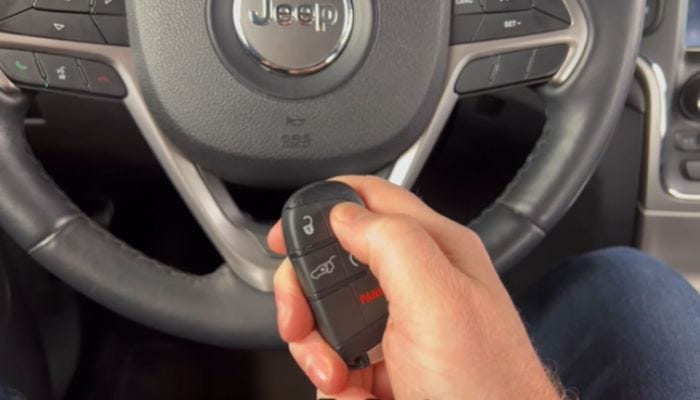
Place the dead key fob against the start button. Press the brake pedal and push the start button to start the Jeep.
Conclusion
Solving the “Jeep Grand Cherokee Key Fob Not Detected” issue can be straightforward. Check your fob’s battery first. If the problem persists, consult your dealership. Regular maintenance ensures your key fob functions smoothly. Always keep a spare key fob handy for emergencies.
Stay proactive to avoid unexpected inconveniences.
